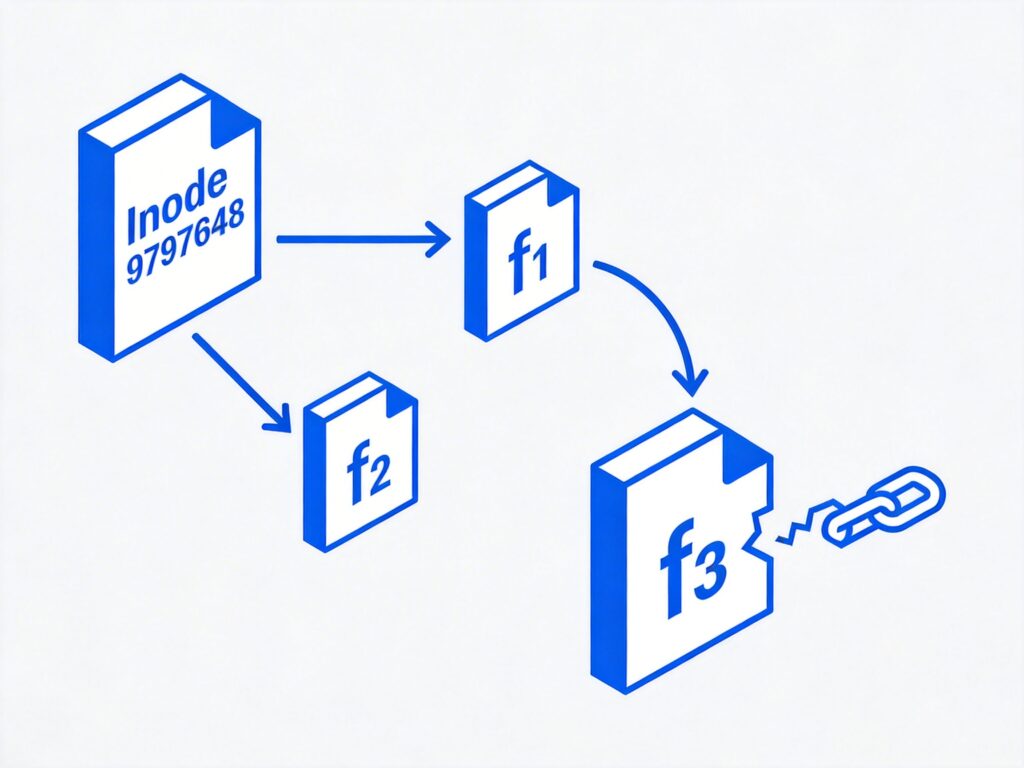
Understanding Links in Linux
In Linux, there are two primary types of links: Hard Links and Symbolic Links (Soft Links). By default, the ln command creates a hard link.
Hard Links
A hard link is a direct reference to a file's inode (Index Node). Every file on a Linux filesystem has a unique inode number. Creating a hard link essentially creates another name that points to the same underlying data blocks.
Key characteristics:
- All hard links to a file share the same inode number and data.
- Deleting the original filename or any hard link does not delete the data as long as at least one hard link remains.
- Hard links cannot cross filesystem boundaries and cannot link to directories (typically).
Symbolic Links (Soft Links)
A symbolic link, or soft link, is a special file that contains a pathname pointing to another file or directory. It functions similarly to a shortcut in Windows.
Key characteristics:
- A symbolic link has its own inode number, separate from the target.
- It can link across different filesystems and can link to directories.
- If the target file is moved or deleted, the symbolic link becomes a "broken link" (dangling link).
Practical Demonstration
Let's create test files and links to see the differences.
# Create a test file
$ touch f1

# Create a hard link to f1
$ ln f1 f2

# Create a symbolic link to f1
$ ln -s f1 f3
Now, examine the files with ls -li (the -i flag shows inode numbers):
$ ls -li
# Example output:
# 9797648 -rw-r--r-- 2 user group 0 Apr 21 08:11 f1
# 9797648 -rw-r--r-- 2 user group 0 Apr 21 08:11 f2
# 9797649 lrwxrwxrwx 1 user group 2 Apr 21 08:11 f3 -> f1
Observations:
f1and the hard linkf2share the same inode number (9797648). The link count (the number after permissions) is 2.- The symbolic link
f3has a different inode number (9797649), is marked with anl(link), and clearly points tof1.
Let's test the behavior:
# Add content to the original file
$ echo "Content in f1" >> f1

# Read from all three references
$ cat f1  # Output: Content in f1
$ cat f2  # Output: Content in f1
$ cat f3  # Output: Content in f1

# Delete the original file
$ rm f1

# Check the links
$ cat f2  # Output: Content in f1 (Hard link still works)
$ cat f3  # Error: No such file or directory (Symbolic link is broken)
Key Differences and Summary
The table below summarizes the core differences:
| Aspect | Hard Link | Symbolic Link |
|---|---|---|
| Inode | Shares the same inode as the target. | Has its own distinct inode. |
| Target Deletion | Data persists if any hard link exists. | Becomes a broken link if target is moved/deleted. |
| Filesystem | Cannot cross filesystem boundaries. | Can link across different filesystems. |
| Directories | Generally not allowed (except for superuser). | Can link to directories. |
| Command | ln source target |
ln -s source target |
In short, a hard link is another name for the same file data, while a symbolic link is a pointer to a file's pathname. Use hard links for redundancy within the same filesystem, and symbolic links for flexible references, including across filesystems or to directories.